
Is it the click, or the sale?
When a search isn't selling, two numbers show where it breaks: how often shoppers who see your product click it, and how often a click becomes a purchase. Search Query Performance holds both, for your product and for the whole market, but one week and one file at a time.
This skill lines up every week you download and compares your numbers with the market's on every search, so you can see whether you're losing the click or the sale.
What you get
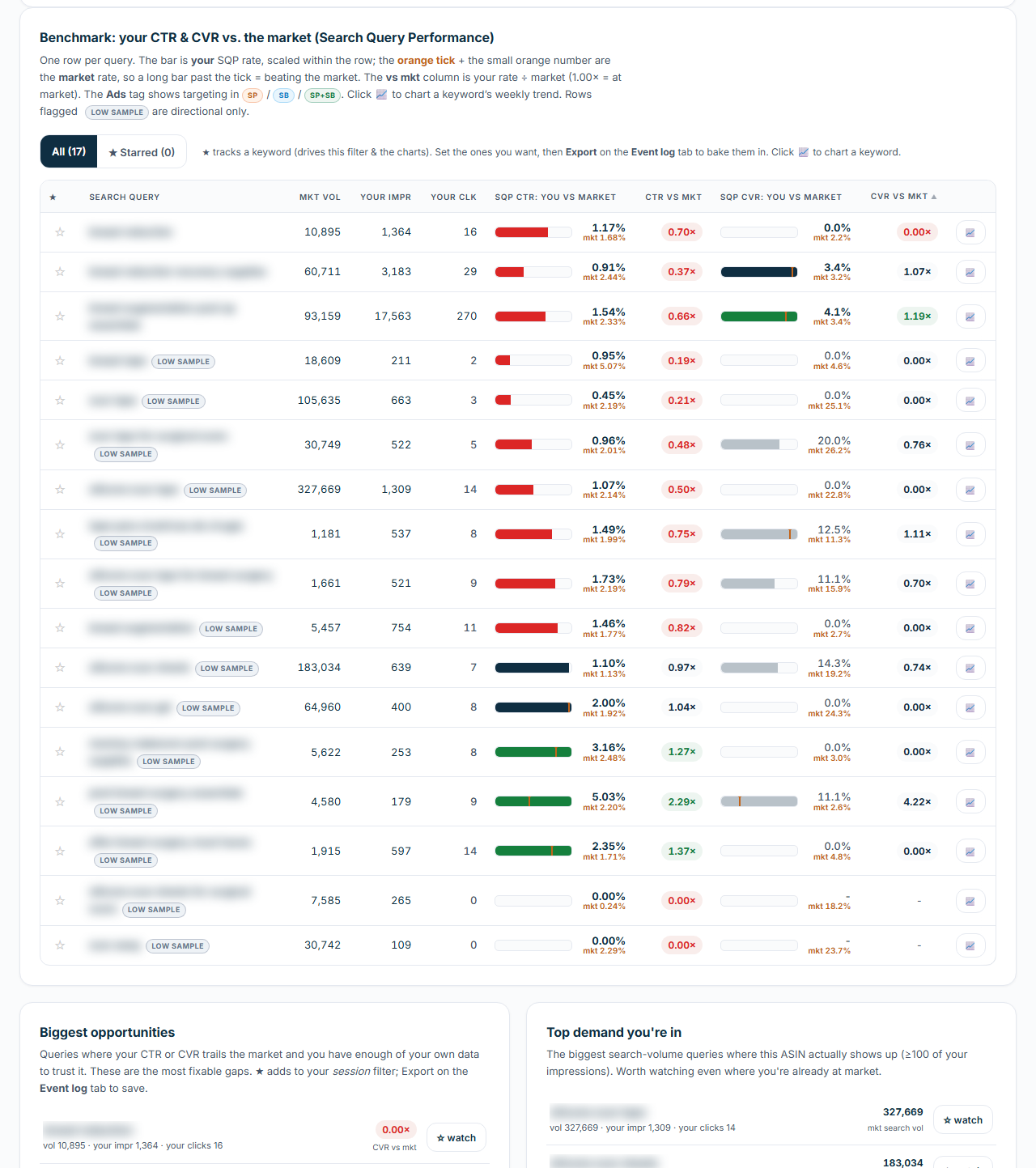
Click-through rate is how often your product, shown in search, gets the click. Conversion rate is how often that click becomes a purchase. The skill works out both for your product and for the whole market on every search, as an index: 1.00 means you match the market, above 1 you beat it, below 1 you trail it.
You get one page you open in your browser, with six tabs:
- A Start here guide.
- The benchmark table: your rates against the market's for each search, with the index and a weekly chart.
- Search intent, which groups your searches by the words they share and shows where shoppers click but don't buy.
- Two lists: the searches where you beat the market, and the ones where you trail it, worst gap first. The second list is your to-do list.
- An event log where you mark listing changes, such as a new main image, so each change shows as a dated line on the charts.
Your starred keywords and logged changes carry over to the next run through the page's Export button.
Numbers that hold up
- Every rate is worked out from the report's raw counts. The report's own rate columns divide by search volume, so they aren't click-through or conversion rates, and the skill leaves them out.
- A search where your product had fewer than 100 impressions or 15 clicks is marked low sample, so a thin week never passes for a firm result. You can change those limits.
- On a product with variations, Amazon credits the family's search clicks to the child that shows in search and the sales to whichever sibling sold, so that child's conversion rate is unreliable. The skill tells you when that applies.
- "Market" means the whole field of products shown for that search.
What you need
- Amazon Brand Registry, because Search Query Performance lives in Brand Analytics, which Amazon shows only to enrolled brands.
- Search Query Performance downloads in the ASIN view, one file per week. Two weeks draw a first trend line, and one week gives a single snapshot.
- A child ASIN, the product ID of one variation such as a size or color. A variation parent returns an empty file, so pick the child with the most sessions (page visits) in your Business Report.
- A Sponsored Products Search Term Report, if your ads run and you want each search marked as advertised or not (optional).
- The Claude desktop app with Claude Cowork. You don't need to install anything else, and the first section of the SOP, Before You Start, shows you how to add the skill.
Your product appears in the report once it's shown in search, so a newly launched brand can start early, and an established brand can track every listing change week by week. Each weekly file holds up to roughly 100 searches for one product, so your rarest searches may not show.
If you haven't launched a product yet, start with Product Validation, which helps you check a product before you buy inventory.
How a run goes
- Download one Search Query Performance file per week for one child ASIN, from Brand Analytics in Seller Central, in the ASIN view.
- Type /amazon-sqp-ctr-cvr-benchmark in a Claude Cowork chat and attach them.
- Open the page and start with the searches where you trail the market.
- Log each listing change in the event log, and run it again each week with the new file.
Questions
Does it tell me why I'm behind?
It shows whether the gap is the click or the sale. The SOP's checklist covers what to look at for each: price, main image and title when shoppers don't click, and reviews, A+ content and the offer when they click and don't buy.
Does it change anything in my Amazon account?
No. It reads the files you download, and nothing is written back to Amazon.
Where it fits
Run it weekly for each product you're working on. When it shows a gap, fix the listing, log the change, and watch the weeks that follow. For a monthly call on every keyword in the account, use the Search Query Performance Deep Analysis alongside it.
In the download
One zip file. It holds the skill package, which you add once in Claude Cowork (Customize, then Add, then Upload Skill), and the SOP as both PDF and Word. The SOP is the manual: what to download from Amazon, how to run the skill, and what to do with the output. Version 2.2.5, updated October 2026.
If it isn't right for you
It's a one-time purchase of $47. If the Benchmark isn't right for you, email us within 14 days of buying it and we'll refund the full price. You don't have to give a reason.