
Your ad reports can't show what they never reached
Your Search Term Report shows how your ads did on the searches they already reach. It says nothing about the searches where they barely appear. Amazon counts how often shoppers search each term in the Search Query Performance report, inside Brand Analytics, but lining that up against your ads by hand, week by week, is slow work.
Demand beside coverage, keyword by keyword
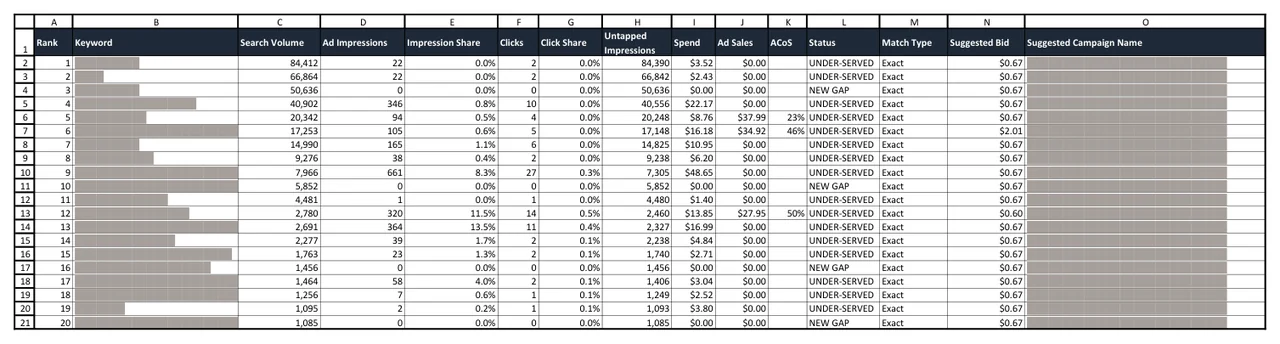
The skill joins the two reports and works out your impression share for every keyword: your ad impressions (the times your ad was shown) divided by the number of searches. Then it ranks the gaps by the impressions you're missing, so a keyword with 50,000 searches at 2% share comes before one with 300 searches at none.
If you've just launched a brand-registered product, it shows which searches your ads aren't reaching yet. On an established account, it shows where to grow next.
What you get
- An Excel workbook whose main sheet ranks up to 200 gap keywords, each with its search volume, ad impressions, impression share, a suggested bid and a campaign name ready to use.
- The suggested bid is what your account can afford: your revenue per click times your target ACOS (ad spend divided by ad sales). Where a keyword has its own sales history, that wins, capped at three times the default.
- Sheets for the keywords already covered, the proven losers and the terms left out, each with the reason, plus run notes that record every setting the skill used.
- With a Business Report and a bulk operations file, a first sheet that ranks your products by sales per ad dollar, so you can see which one to fund first.
What it can't tell you
The skill measures where your ads are missing. It can't tell you a keyword will be profitable. A proven loser, a keyword with plenty of clicks at more than twice your target ACOS, is listed apart, and the skill points to something such as the price, the images or the reviews holding its sales back.
A big search your product doesn't serve is still only a number. Read the top rows against your listing before you launch any of them.
What you need
- Amazon Brand Registry, because the search counts come from Search Query Performance, which Amazon shows only to brands enrolled in Brand Registry.
- A product that's live on Amazon, with Sponsored Products ads running. If you haven't launched yet, start with Product Validation.
- Search Query Performance exports, one per week, covering your date range.
- A Search Term Report for Sponsored Products for exactly the same dates. Mismatched dates create gaps that aren't real, so this is the most important rule for this skill.
- Your target ACOS, brand terms and product details, if you have them. Otherwise the skill uses stated defaults.
- The Claude desktop app with Claude Cowork. You don't need to install anything else, and the first section of the SOP, Before You Start, shows you how to add the skill.
How a run goes
- Download the weekly Search Query Performance files and the Search Term Report for the same dates.
- Type /amazon-ppc-gap-finder in a Claude Cowork chat and attach them.
- The skill asks for anything missing in a single message, with the defaults shown.
- Open the workbook. Launch the top 10 to 20 gaps first, let them gather data, then expand.
Questions
Why does each gap get its own campaign?
A budget applies to a whole campaign. With one keyword per campaign, in exact match, a budget raise goes only to the keyword that earned it.
Do the numbers match my other Amazon reports?
Not exactly. Search Query Performance counts searches, and one shopper can see your ad more than once, so impression share can run above 100%. The skill flags those rows, and the run notes record every column it read.
Will it launch the campaigns for me?
No. It gives you the plan: keywords, bids and campaign names. The SP Bulk Builder turns the top gaps into an upload file, and nothing reaches your account until you upload it.
Where do my reports go?
Into your own Claude app, on your own Claude account. They never come to Comuteo.
Who I am
I'm Rogerio de Andrade. I spent 30 years developing brands in multinationals, then built my own Amazon private label business past $100,000 in sales. I use this skill in my own client work.
Where it fits
Run it monthly, or when a product sells well with little advertising behind it. The campaign names already follow the SP Bulk Builder's naming, so the top gaps go straight into it as the single-keyword list. For missing campaign types, use the PPC Cheat Sheet.
In the download
One zip file. It holds the skill package, which you add once in Claude Cowork (Customize, then Add, then Upload Skill), and the SOP as both PDF and Word. The SOP is the manual: what to download from Amazon, how to run the skill, and what to do with the output. Version 1.5.2, updated October 2026.
If it isn't right for you
It's a one-time purchase, with no monthly fee and no percentage of your ad spend. If the PPC Gap Finder isn't right for you, email us within 14 days of buying it and we'll refund the full price. You don't have to give a reason.