
Amazon PPC Audit: 9 Steps, Real Client Data
One ACOS number hides where the money goes. These nine checks, run on two Amazon reports, show which campaigns make money and which ones lose it.
Your ACOS is your ad spend divided by your ad sales, and it is one number for the whole account. An Amazon PPC audit takes that number apart, so you can see which campaigns make money and which ones lose it. I run the nine checks below on the client accounts I manage, and the real numbers in them come from one of those accounts.
What an Amazon PPC audit checks
An Amazon PPC audit is a review of your whole ad account against your sales, and it ends in a ranked list of fixes. It reads your campaigns, match types, placements and search terms against the target ACOS you can afford. Its purpose is to find which campaigns earn their spend and which ones lose money, so you know what to change first.
Before you start: set a target you can afford
Every check below compares a number with your target ACOS, so the target has to be right first. Your break-even ACOS is your profit margin before ad spend. If you keep 35% of each sale before ads, spending 35% of sales on ads leaves nothing, so any target above 35% loses money on every sale. The guide on how to set your target from your margin shows the arithmetic.
1. Download two reports for the same 60 days
The Business Report (Detail Page Sales and Traffic by ASIN) comes from Seller Central, and the bulk operations file comes from Amazon Ads. Both must cover the same dates, and I use 60 days because that window holds enough clicks to judge and is still recent.
| Report | Where it comes from | What it adds to the audit |
|---|---|---|
| Business Report | Seller Central | All your sales and traffic by product |
| Bulk operations file | Amazon Ads | Your campaigns, bids and placement multipliers with their results |
| Search Term Report (optional) | Amazon Ads console | The searches behind your clicks |
Your sales are in one report and your ads in the other, and most of what an audit finds only shows up once the two are read together. Joining them is the slow part by hand, and the PPC Account Audit skill builds the dashboard from the same two files.
2. Separate brand searches from everything else
Searches for your own brand usually sell at a low ACOS, because those shoppers already want your product. Mixed into one total with the rest, they make the account's ACOS look healthier than your non-brand spend really is. The guide to Search Query Performance shows why I keep brand searches apart in that report too.
Start with a list of your brand names and their common misspellings, because the split is only as good as that list. Then sort your ad results into branded and non-branded searches and work out the ACOS of each group. On one client account I manage, brand searches ran at about 29% ACOS in August and September 2026 while everything else ran at about 88% against a 50% target. That split is an estimate, because it was built from the brand names in the account.
3. Compare match types and targeting
Group your results by how each ad was targeted: exact, phrase and broad match keywords, automatic campaigns and product targeting. Amazon's targeting guide names four groups inside automatic campaigns: close match, loose match, substitutes and complements. You can compare each of them the same way, and then put the ACOS of every group next to your target.
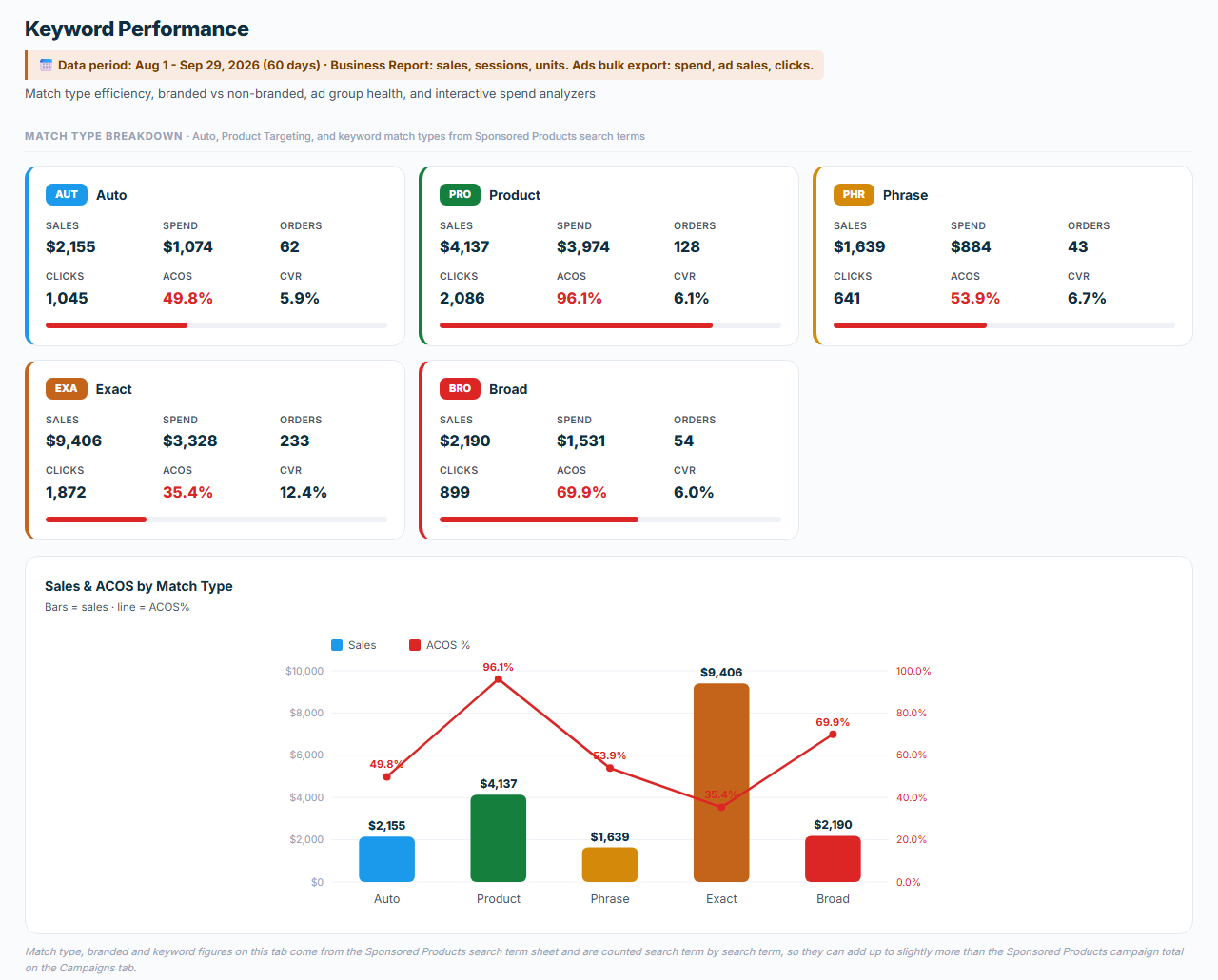
Product targeting ran at 96% ACOS on the same account while exact match keywords ran at 35% against the 50% target. Amazon's guide says exact match tends to give the highest conversion rates, and this account followed that pattern, so a gap that wide points the next dollar of budget toward exact match.
4. Check each campaign against its break-even cost per click
The break-even cost per click is the most a campaign can pay for a click and still hit your target ACOS. Revenue per click is ad sales divided by clicks, and break-even cost per click is revenue per click times your target ACOS. A campaign that brings in $3.00 per click on a 30% target has a break-even of $3.00 x 0.30 = $0.90. Compare that with what it pays per click, which is spend divided by clicks.
| Paid per click, against $0.90 | Cut needed to reach $0.90 | How I read it |
|---|---|---|
| $0.80 | None | The bid is affordable, so check the budget next |
| $1.20 | 25% | Cut the bid |
| $2.00 | 55% | Conversion problem |
When the bid would have to fall by more than half, I mark the campaign as a conversion problem, because a cut that deep means the bid is the wrong lever. The listing, the price or the targeting needs attention first.
5. Look at your placement multipliers
Your ads show in three placements: the top of search, the rest of the search results and product pages. A placement multiplier adds a percentage to your bid for one of them. A $0.55 bid with a 75% top-of-search multiplier can pay up to $0.55 x 1.75 there, which is about $0.96.
That example assumes fixed bids or dynamic bids down only. The bidding strategy is a choice you make for each Sponsored Products campaign, and under dynamic bids up and down Amazon can raise a bid by up to 100% for clicks more likely to convert. Amazon's dynamic bidding guide shows a $1.00 bid becoming up to $2.00. List every multiplier in force with the spend under it and the bidding strategy of its campaign.
6. Find search terms that spend without selling
The Search Term Report lists every search that showed your Sponsored Products ads, with its clicks, spend and sales. Wasted ad spend sits in searches with clicks and no orders, but each search needs enough clicks before you judge it. One divided by your conversion rate gives that number, which works out to about 10 clicks at a 10% rate and 20 at 5%. Luck still plays a part, because at 10% the chance of 10 clicks with no order is 0.9 to the power of 10, or about 35%.
Once a search has had enough clicks, I negate it if it has no orders or if its orders came at an ACOS above one and a half times the target (45% on a 30% target). I hold back a search that still brings orders, one in a paused campaign and one that already runs as an exact match keyword in that ad group. A weekly run on a client account on 5 October 2026 put twelve searches on the negate list, and one of them went into the negatives file. The guide on when to negate a search term explains each rule.
7. Look for the campaigns you don't run
A missing campaign never shows in a report, because reports are built from the campaigns you already have. Make a grid with one row per product and one column per campaign type, and the empty squares are your gaps. Read each gap against the product's stage, because a launch product and a harvest product need different campaigns.
Brand shielding comes first, and I flag that gap whatever stage the product is in. My library holds 41 campaign types (19 Sponsored Products, 12 Sponsored Brands and 10 display ads), and the guide to campaign types by goal and stage explains how I choose among them.
8. Decide whether the ads or the listing is the problem
In one account I audited, clicks ran at four times the category average while conversion sat at the average. The ads were doing their job and the listing was holding sales back, so raising bids would have bought more of the same clicks. A bid that would have to fall by more than half in step 4 points the same way. Both signs mean you should look at the listing, the price and the reviews before you touch bids. A done-for-you audit reads the ads, the listing and the price together.
9. Rank what you found by impact
An Amazon PPC audit ends in actions, so put each finding next to the money it affects. List no more than six actions with the largest first, and note the effort each one takes. The skill ranks its actions by impact and adds an estimate of the dollar opportunity.
Then check your TACOS, which is your ad spend as a share of all your sales, because it shows whether advertising lifts the whole business or only buys the sales it reports.
How often to run the audit
I run the full audit every month, and also when I take on a new account and before I set its strategy. Harvesting and negating search terms and changing bids are weekly work, which my weekly PPC management service covers.
Amazon PPC audit checklist
| Step | What to check | What flags a problem |
|---|---|---|
| Before you start | Target ACOS | Above your margin before ads |
| 1. Reports | Date windows | The two reports differ |
| 2. Brand split | Brand and non-brand ACOS | Non-brand above target |
| 3. Match types | ACOS by targeting group | Any group above target |
| 4. Break-even | Cost per click | A cut of over 50% needed |
| 5. Placements | Multipliers and bidding strategy | Paying more than you bid |
| 6. Search terms | Clicks and orders per search | 1 / conversion rate in clicks, no order |
| 7. Missing campaigns | Products by campaign type | No brand shielding |
| 8. Ads or listing | Clicks against conversion | High clicks, average conversion |
| 9. Ranking | Money each finding affects | More than six actions |
What to do with the findings
Work through the actions in the order of your list, and make the search term changes before the bid changes so the bids work on clean traffic. Keep a copy of your old bids before you upload anything, so you can put them back if a change goes wrong.
Frequently asked questions
How often should you do an Amazon PPC audit?
I run a full audit once a month on the accounts I manage. I also run one when I take on a new account and before I set strategy for it.
What is the difference between ACOS and TACOS?
ACOS is your ad spend divided by your ad sales. TACOS is your ad spend divided by all your sales, organic ones included, so it shows whether your ads lift the whole business.
How many clicks without a sale are too many?
Divide one by your conversion rate to get the clicks one order takes on average, which is about 10 clicks at a 10% rate. Treat that as the minimum, because at 10% there is still about a 35% chance of 10 clicks in a row with no order.
What is a good ACOS for Amazon PPC?
A good ACOS is one below your break-even ACOS, which is your profit margin before ad spend. If you keep 35% of each sale before ads, an ACOS above 35% loses money on every sale. Each product has its own margin, so the right target can differ between products.
Can you audit Amazon PPC without a paid tool?
You can, because everything the audit needs is in the Business Report and the bulk operations file. A spreadsheet is enough to join them and do the math. The PPC Account Audit skill does the join for you, which is the slow part by hand.
Do I have to give someone access to my account for an audit?
An audit works from reports you download, so nobody needs access to your Amazon account. The PPC Account Audit skill reads those downloads in your own Claude app and changes nothing in your account.
Want a second pair of eyes on your account?
Book a free 20-minute strategy call. Bring your numbers, and we go over what I would fix first.
Book a free strategy call