
One ACOS number hides where the money goes
Your ACOS (ad spend divided by ad sales) is one number for the whole account. Underneath it, some campaigns make money and some lose it. Searches for your own brand often sell at a low ACOS, so they can hide what everything else costs.
When sales drop or ACOS creeps up, the evidence sits in two reports, sales in one and ads in another, and they have to be joined before you can see much.
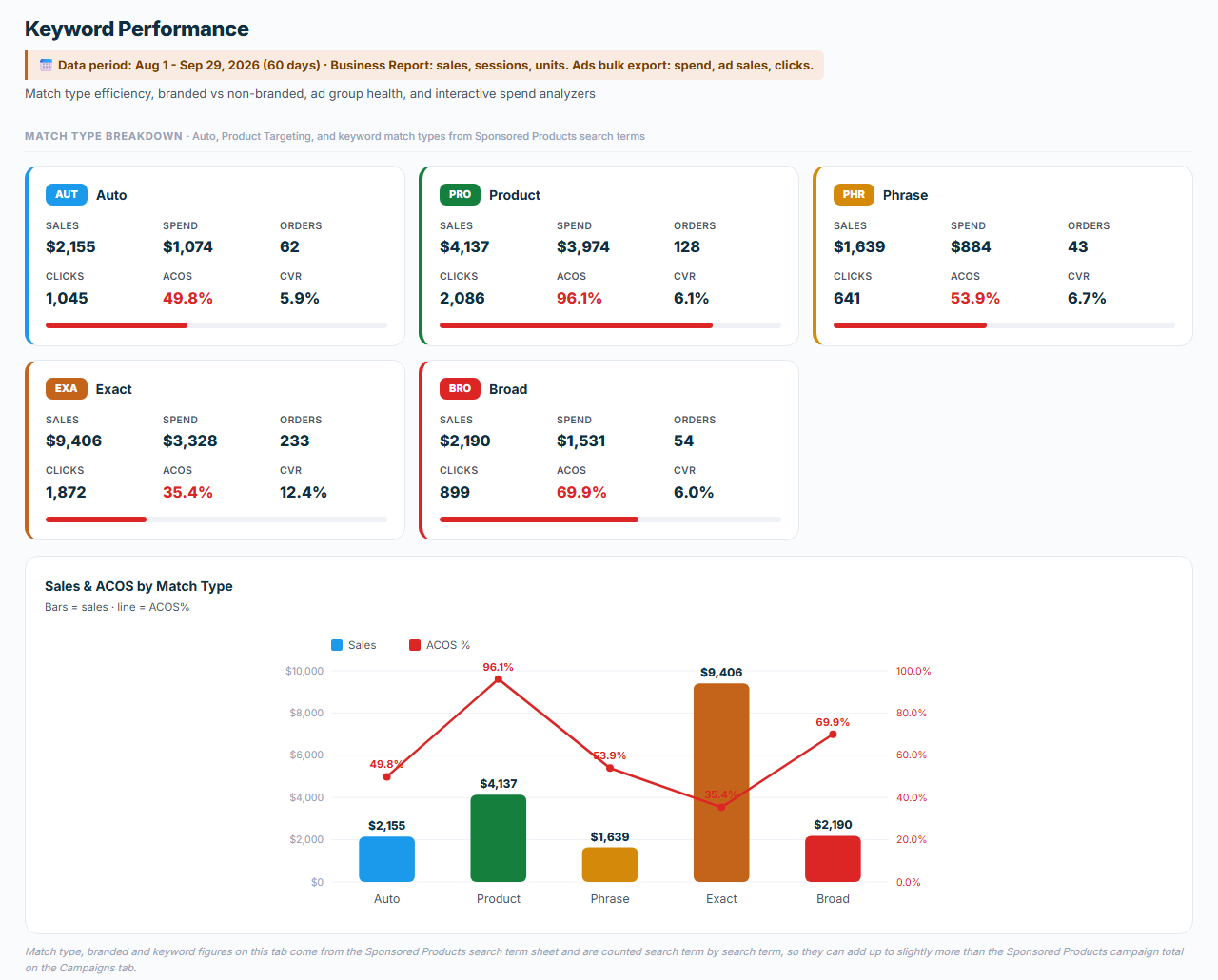
On one client account I manage, with a 50% target, the audit for August and September 2026 showed product targeting at 96% ACOS against 35% for exact match keywords, and searches for the brand at about 29% against about 88% for everything else. The brand split is an estimate built from the brand names in the account.
The whole account on one screen
You get one file that opens in your web browser, with four tabs and a brand filter:
- Business Overview: sales, ad spend, ACOS, TACOS (ad spend as a share of all sales), ad sales against organic sales, and your top ten products.
- Campaign Performance: results by ad type and by placement (top of search, the rest of the search results, product pages), the bid multipliers in force, and a verdict for each campaign.
- Keyword Performance: match types, brand searches against everything else, ad group health, and finders for high-ACOS keywords and clicks with no orders.
- Analysis and Recommendations: health gauges, four findings, up to six actions ranked by impact with an effort tag, and an estimate of the dollar opportunity.
If you launched recently, it shows how much of your revenue comes from ads. On an established account, it shows where spend is leaking.
Bid, budget or conversion
Each campaign's cost per click is checked against its break-even cost per click, the most it can pay and still hit your target ACOS at its own conversion rate. The verdict says whether the bid or the budget needs to change. If the bid would have to fall by more than half, the audit marks it as a conversion problem, because a cut that deep means the bid is the wrong lever.
The audit also lists every bid multiplier in force, with the spend under it. A multiplier adds a percentage to a bid for one placement, so a $0.55 bid with a 75% top-of-search multiplier really pays $0.96 there. If you pay more per click than you bid, that table is one place to look.
Numbers you can check
Python calculates every number from your two reports, so the same files give the same results, and each tab names the report and dates behind its figures. The brand split is an estimate built from the brand names you confirm, and the dashboard lists them. A notice at the top tells you if a file is missing or the two don't match.
What you need
- A product that's live and selling on Amazon, with ads running. If you haven't launched yet, start with Product Validation.
- Your Business Report (Detail Page Sales and Traffic by ASIN) for the last 60 days. If Amazon gives it to you month by month, the SOP shows how to combine the months.
- Your bulk operations file for the same 60 days, the spreadsheet of your campaigns and bids that you download from Amazon Ads.
- Your target ACOS. Without it the audit still builds, but the break-even cost per click and the campaign verdicts are missing.
- The Claude desktop app with Claude Cowork. You don't need to install anything else, and the first section of the SOP, Before You Start, shows you how to add the skill.
How a run goes
- Download both reports for the same 60-day window.
- Type /amazon-ppc-account-audit in a Claude Cowork chat and attach both files.
- Answer the intake in one message: marketplace, account name, the date label for the report, your target ACOS, and a check of the brand list the skill detects from your product titles.
- Open the dashboard. It's one file you can keep, send or present.
Questions
My ads have run for less than 60 days. Can I still use it?
Yes. Download both reports for the days you have, and tell the skill how many days they cover.
Will it tell me what to do, or only show data?
It ends with up to six actions ranked by impact, each with an effort tag, and a verdict for each campaign once you give it your target ACOS. You decide which ones to act on.
Does it change anything in my Amazon account?
No. It reads the two reports you download and builds a file on your computer. Any change in your account is one you make yourself.
Where do my reports go?
Into your own Claude app, on your own Claude account. They never come to Comuteo.
Who I am
I'm Rogerio de Andrade. I spent 30 years developing brands in multinationals, then built my own Amazon private label business past $100,000 in sales. I run this audit on the client accounts I manage.
Where it fits
Use it for a monthly review, a new account, or before you set strategy. Its findings feed the Keyword Harvester and Negator and the Bulk Bid Optimizer, and the PPC Cheat Sheet shows which campaign types are missing.
In the download
One zip file. It holds the skill package, which you add once in Claude Cowork (Customize, then Add, then Upload Skill), and the SOP as both PDF and Word. The SOP is the manual: what to download from Amazon, how to run the skill, and what to do with the output. Version 1.7.7, updated October 2026.
If it isn't right for you
It's a one-time purchase, with no monthly fee and no percentage of your ad spend. If the PPC Account Audit isn't right for you, email us within 14 days of buying it and we'll refund the full price. You don't have to give a reason.