
Amazon PPC Negative Keywords: When to Add Them
Negate a search too early and you lose sales, and wait too long and it keeps spending. Your own conversion rate tells you when a search has had a fair chance.
Amazon PPC negative keywords stop your Sponsored Products ads from showing for searches that spend money and never sell. Add a search term as a negative once it has had enough clicks to judge at your own conversion rate and still has no orders. Hold it back if it still brings orders, sits in a paused campaign or already runs as an exact match keyword in the same ad group.
Your Search Term Report lists every search that showed your ads, with the clicks, spend and sales each one brought. The hard call is a search with a few clicks and no orders, and on the client accounts I manage I make that call from the account's own conversion rate.
What an Amazon PPC negative keyword does
A negative keyword tells Amazon not to show your ad for a search. Amazon's targeting guide says negative targeting works in both automatic and manual campaigns, and you can set it for a whole campaign or for selected ad groups. When I negate a search at ad group level, the ad stops showing for it in that ad group.
Amazon recommends phrase or exact match for negative keywords, and the two block different amounts of traffic:
- Negative phrase match blocks any search that contains the complete phrase or a close variation of it.
- Negative exact match blocks the exact phrase or a close variation of it.
Negative exact is the narrower choice, because the longer searches that contain the same words keep running. A negative phrase removes all of them at once, so one phrase can cut off searches that would have sold.
How many clicks before you negate a search term
Your conversion rate is the share of clicks that become orders, and it tells you how many clicks one order takes on average. Divide 1 by the rate to get your clicks per order:
- At a 5% conversion rate, one order takes about 20 clicks.
- At 10%, it takes about 10 clicks.
- At 15%, it takes about 7 clicks.
- At 20%, it takes about 5 clicks.
A search with 3 clicks and no orders has not had a fair chance at a 10% conversion rate. Keep it on a watch list until it reaches the number of clicks your own rate implies. The Keyword Harvester and Negator works the same way: it sets the click count from the account's conversion rate, and a search waits on the watch list until it gets there.
Amazon's targeting guide uses a fixed figure and recommends evaluating a keyword's performance after it has received at least 20 clicks before you add it as a negative. The two numbers fit together if you treat Amazon's 20 clicks as a floor and your own count as the figure to wait for when your product converts less often. One order takes more than 20 clicks when your conversion rate is below 5%, so your own count is the higher bar. When your rate is above 5%, your clicks per order sit under 20, but the extra clicks up to Amazon's floor still protect you from a run of bad luck.
Allow for bad luck
Even a search that converts at exactly your average rate will sometimes go a run of clicks without an order. If every click has the same chance of converting, the chance of no order is the share of clicks that do not convert multiplied by itself once for each click. A 10% conversion rate means 90% of clicks bring no order, so the chance of 10 clicks with no order is 0.9 to the power of 10, about 35%.
The odds fall as the clicks build up:
- 10 clicks with no order happen about 35% of the time.
- 20 clicks with no order happen about 12% of the time.
- 30 clicks with no order happen about 4% of the time.
A search that converts at your average rate has about a one in three chance of showing no order at 10 clicks, and that chance falls to about one in eight at Amazon's minimum of 20 clicks. The click count is the minimum before you judge a search, and a bigger budget can afford to wait a little longer.
When to add negative keywords
Once a search has had enough clicks, I put it on the negate list in two cases. The first is a search with no orders. The second is a search with orders at an ACOS above one and a half times your target, where ACOS is ad spend divided by ad sales. That line sits at 45% for an account with a 30% target.
The negate list is a list for review, and the two cases end differently. A search with no orders goes through the checks below and, if it passes them, into the negatives file. A search with orders at a high ACOS stays on the list for review and is then held back for a bid cut, because it still sells.
Searches to hold back
A search that still brings orders
A search with orders and a high ACOS is selling at too high a cost per sale. A negative would end the sales along with the cost, so I cut its bid and leave it running, using the method in the bid guide to set the bid from your target ACOS.
A search in a paused campaign
A paused campaign spends nothing, so a negative there saves nothing. I leave the search alone and spend the time on the campaigns that are live.
A search that already runs as an exact match keyword in the same ad group
Sometimes the search on the list is also an exact match keyword in the ad group where the negative would go. A negative there would stop the keyword from showing your ad for the very search it targets, so pause the keyword or cut its bid instead.
What one weekly run looked like (5 October 2026)
I ran the Keyword Harvester and Negator over the Search Term Report of a client account I manage on 5 October 2026. Twelve searches reached the negate list, and the skill held back eleven of them:
- 7 still brought orders, so they were held back for a bid cut.
- 2 sat in campaigns that were already paused.
- 2 already ran as exact match keywords in the ad group the negative would go into.
- 1 went into the negatives file.
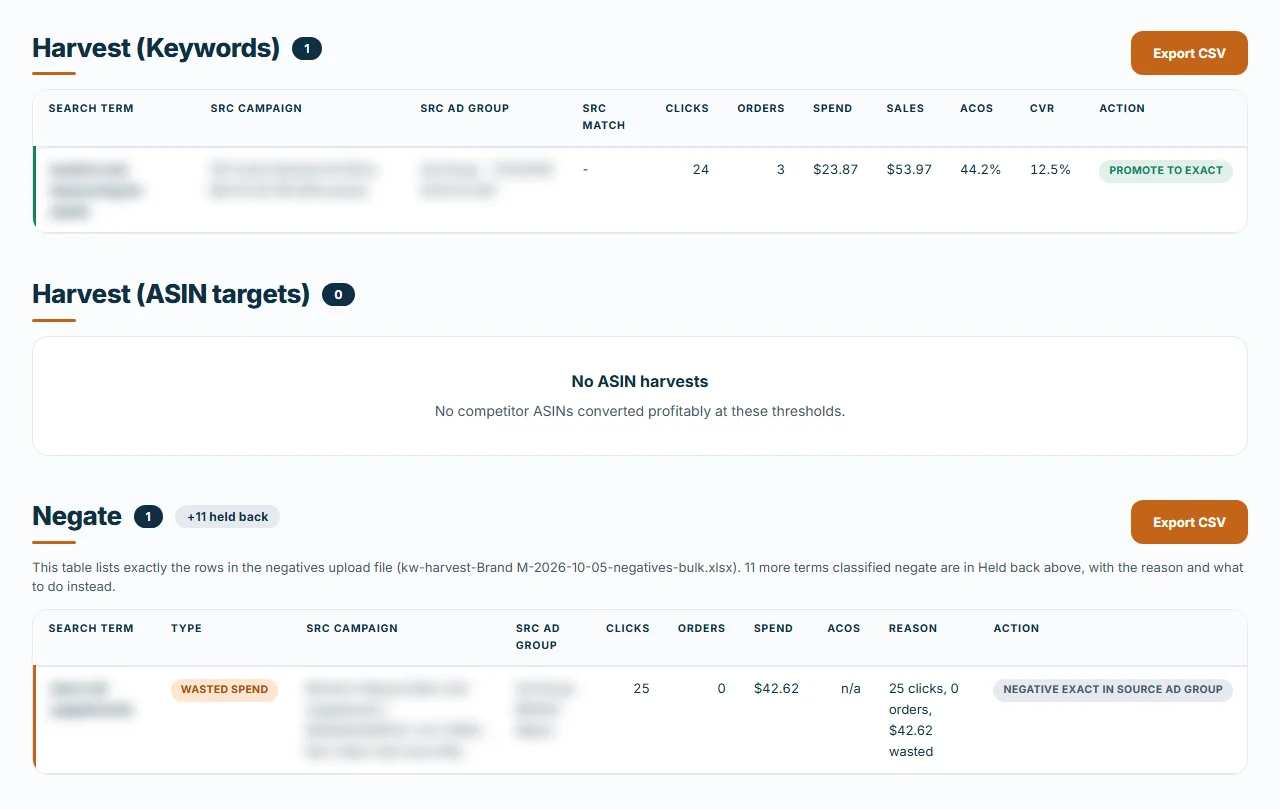
If I had negated all twelve on sight, seven negatives would have ended searches that still sold. Two more would have saved nothing in paused campaigns, and the last two would have blocked live exact match keywords from their own searches, which left one search out of twelve that needed a negative.
Harvest the winners in the same pass
The same report shows the searches that already sell at or under your target ACOS. Keyword harvesting means adding those as exact match keywords, so you can bid on them directly. I do the harvest and the negatives in one weekly pass before I change any bids, so the bid changes work on clean traffic, and every account in PPC management has its search terms worked the same way each week.
Mistakes that cost sales
- Negating a search after a handful of clicks, when a run of 3 clicks with no order happens about 73% of the time at a 10% conversion rate (0.9 to the power of 3 is 0.729).
- Negating a search that still sells, when cutting its bid would keep the orders.
- Negating a search that is also a live exact match keyword in the same ad group, which stops the keyword from showing your ad for its own search.
- Uploading a wasted spend list as it stands. The negative keyword candidates file from the Search Term Dashboard has no click minimum, so a search with one click and no order is on it too. Treat a list like that as a list to review.
The weekly order
Each week I start with the Search Term Report, harvest the searches that sell and negate the ones that have had a fair test with no orders. The rest are held back with a reason for each, and the bid changes come after that pass. If the account has never had this review, the audit checklist is the place to start.
Frequently asked questions
How many clicks should a search term get before I negate it?
Divide 1 by your conversion rate to get the clicks one order takes, so a 10% rate means about 10 clicks. Amazon's targeting guide recommends evaluating a keyword after at least 20 clicks before you add a negative. Wait for whichever number is higher, and keep the search on a watch list until it gets there.
Should I negate a search term that has orders but a high ACOS?
I cut its bid and keep it running. A search with orders at an ACOS above 1.5 times target goes on the negate list for review on the accounts I manage, and it is then held back for a bid cut because it still sells.
What happens if I negate a search that is also an exact match keyword in the same ad group?
The negative stops that keyword from showing your ad for the very search it targets. Pause the keyword or cut its bid instead. The Keyword Harvester and Negator reads your bulk operations file for this case and holds those searches back with a note.
What is the difference between negative exact and negative phrase?
Amazon's targeting guide says a negative exact keyword blocks the exact phrase or a close variation of it. A negative phrase keyword blocks any search that contains the complete phrase or a close variation of it, so it reaches more searches.
How often should I review my Amazon PPC negative keywords?
I review search terms every week and harvest and negate before I change any bids. Amazon's guide suggests letting negatives run for two weeks or more before you change your strategy, and it notes that a negative can be removed later.
Want a second pair of eyes on your account?
Book a free 20-minute strategy call. Bring your numbers, and we go over what I would fix first.
Book a free strategy call