
Amazon PPC Campaign Structure by Goal and Stage
Your ad reports only show the campaigns you already run, so choosing campaign types by goal and by the product's stage is how you see what is missing.
Every Amazon ad report is built from the campaigns you already have. If you never set up a campaign that defends the searches for your brand name, or one that shows your ad on a competitor's product page, no report will tell you it is missing.
A good Amazon PPC campaign structure gives each campaign one goal and fits the product's stage, so that you can check the account against a plan and see the gaps. I plan client accounts by four goals and three product stages, and I check each product against that plan.
What an Amazon PPC campaign structure is
An Amazon PPC campaign structure is the way your campaigns are split by ad type, by targeting and by goal, so that each campaign reports on its own results. When two kinds of targeting share one campaign, the report gives you one blended number and you cannot tell which part earns the money.
The structure has to be planned before launch, because Amazon's guide to targeting with Sponsored Products says a campaign's targeting cannot be changed once it is live, so a change of targeting means a new campaign. Your choice of Amazon PPC campaign types then follows from two questions: what each campaign is for, and what stage each product is in.
The three ad types
The three ad types in my campaign library are Sponsored Products, Sponsored Brands and display ads, and they differ most in what you have to prepare before you can launch them.
- Sponsored Products are the type you can build in bulk. The upload files from the SP Bulk Builder and the PPC Cheat Sheet hold Sponsored Products campaigns only, and Amazon's targeting guide says their automatic ads can appear on shopping results pages and on product detail pages.
- Sponsored Brands need your own headlines, images or video. Amazon lets sellers run them only when their brand is enrolled in Brand Registry, so without it you can plan these campaigns but you cannot launch them.
- Display ads also need your own headlines, images or video, so I set them up by hand after the Sponsored Products build.
Plan that creative work before you add Sponsored Brands or display ads to the structure.
Inside Sponsored Products: auto, keyword and product targeting
Amazon's targeting guide names three targeting options for Sponsored Products, which are automatic, manual and negative targeting. In my builds the manual side is split into keyword campaigns and product targeting campaigns, and each kind runs in campaigns of its own.
Automatic campaigns
In an automatic campaign Amazon picks the searches your ad is matched to from four targeting groups that its guide lists as close match, loose match, substitutes and complements. The SP Bulk Builder makes four auto campaigns, one per targeting type, so that each one reports on its own. It also adds a catch-all auto campaign at a low bid, which is $0.10 unless you change it.
Keyword campaigns and match types
Keyword campaigns target the words you choose in broad, phrase or exact match. Amazon's guide says exact match tends to give the highest conversion rates, and it advises bidding highest on exact, lower on phrase and lowest on broad. The builder makes keyword campaigns for each keyword group in all three match types, and it gives each of your highest-volume keywords a campaign of its own.
Running one keyword in more than one match type is safe, because Amazon's guide says you won't be bidding against yourself across match types. The guide also suggests testing match types for one to two weeks before you pause any of them.
Product targeting
Product targeting shows your ad on the product pages you choose, and the builder aims one campaign at each competitor brand's products. One client account I manage has a 50% target, and its product targeting ran at 96% ACOS against 35% for exact match keywords in August and September 2026. Because the two sat in separate campaigns, the audit could show that the next dollar of budget belonged with exact match.
Negative targeting
Negative targeting works in both automatic and manual campaigns, either for the whole campaign or for selected ad groups, and Amazon recommends phrase or exact match for negative keywords. The negatives are what keep each search in the campaign built for it, so that brand searches go to the brand campaigns. The guide on when to add a negative keyword covers how many clicks a search needs first.
Give every campaign one goal
Each of the 41 campaign types in my library is tagged by goal, because a campaign with one goal is judged against one standard and its numbers are easy to read.
| Goal | What the campaign is for | How it shows up in my builds |
|---|---|---|
| Sales | Profitable orders at or under your target ACOS | Keyword campaigns for searches that already sell |
| Brand shielding | Defending the searches for your own brand, so competitors do not take those shoppers | Brand plus keyword campaigns and a brand-only campaign |
| Research | Finding out what shoppers search for | Auto campaigns, with the searches that sell moved into exact match keywords |
| Organic rank | Pushing a product up the free search results for chosen keywords | The Ranking Push bid strategy on chosen keywords, for a limited time |
The research goal feeds the sales goal, because my Keyword Harvester lists any search that sells at or under your target ACOS as an exact match keyword to add.
Match the campaigns to the product's stage
The library also tags each type by the product's stage, which is launch, expand or harvest. A launch product and a harvest product need different campaigns, so I read every gap against the stage.
Launch covers a product's first eight weeks. My Bulk Bid Optimizer has a Launch strategy for this stage that runs bids a little bolder to gather data and visibility and waits longer before it pauses anything, and it lets ACOS run about one and a half times your target while the data comes in.
Expand is the stage after launch, when the product sells and you want it to reach more searches. Harvest is for an established product where profit comes before growth, and that is the job of the Profit-First strategy. You can set each bid from your target ACOS at every stage.
The weekly harvest and bid routine on a new account starts after one to two weeks of data, and the PPC Cheat Sheet checks for missing campaign types after a month. The Cheat Sheet never guesses a product's stage, so you tell it the stage of each product or skip the question and see every possible gap.
Build brand shielding first
When I audit an account I list the missing campaigns in the order to launch them, and brand shielding comes first. Searches for your brand come from shoppers who already chose you, so I flag a brand shielding gap whatever stage the product is in, and Amazon's targeting guide also suggests bidding on branded keywords as a brand defense strategy.
Brand searches on one client account ran at about 29% ACOS against a 50% target in August and September 2026, while everything else ran at about 88%. The split is an estimate built from the brand names in the account, and it shows how a low brand ACOS can hide what the rest of the account costs. The PPC audit checklist shows how to split brand searches from the rest.
A starting setup for a new product
Before you build, make sure of these points:
- The product is live on Amazon and you have access to Amazon Ads.
- You advertise child SKUs only, one per size or color, because Amazon rejects a parent SKU as ineligible for advertising.
- The start date is today or later, because a start date in the past can get the whole upload rejected.
- You have added up the daily budgets, because each campaign has its own.
The SP Bulk Builder produces this starting structure from your keyword groups, top keywords and competitor ASINs:
- Four auto campaigns, one per targeting type.
- Keyword campaigns for each keyword group, in broad, phrase and exact match.
- A campaign of its own for each of your highest-volume keywords.
- Brand plus keyword campaigns and a brand-only campaign.
- Product targeting campaigns aimed at each competitor brand's products.
- A catch-all auto campaign at a low bid.
A full setup like this runs to 30 to 60 campaigns under one naming pattern. The builder's campaigns are created switched on and start running once Amazon processes the upload, so spot-check a few before you upload the file. Sponsored Brands and display ads are added by hand afterwards.
Check your account for missing campaigns
Make a grid with one row per product and one column per campaign type, and then mark the types each product runs. The empty squares are your gaps, and you read them against each product's stage.
My library holds 41 campaign types: 19 for Sponsored Products, 12 for Sponsored Brands and 10 for display ads. The PPC Cheat Sheet reads your bulk operations file, which is the spreadsheet of your campaigns that you download from Amazon Ads, and it matches those campaigns to the library's types and draws the grid for you. The skill then returns the missing Sponsored Products campaigns in one upload file, created paused for your review.
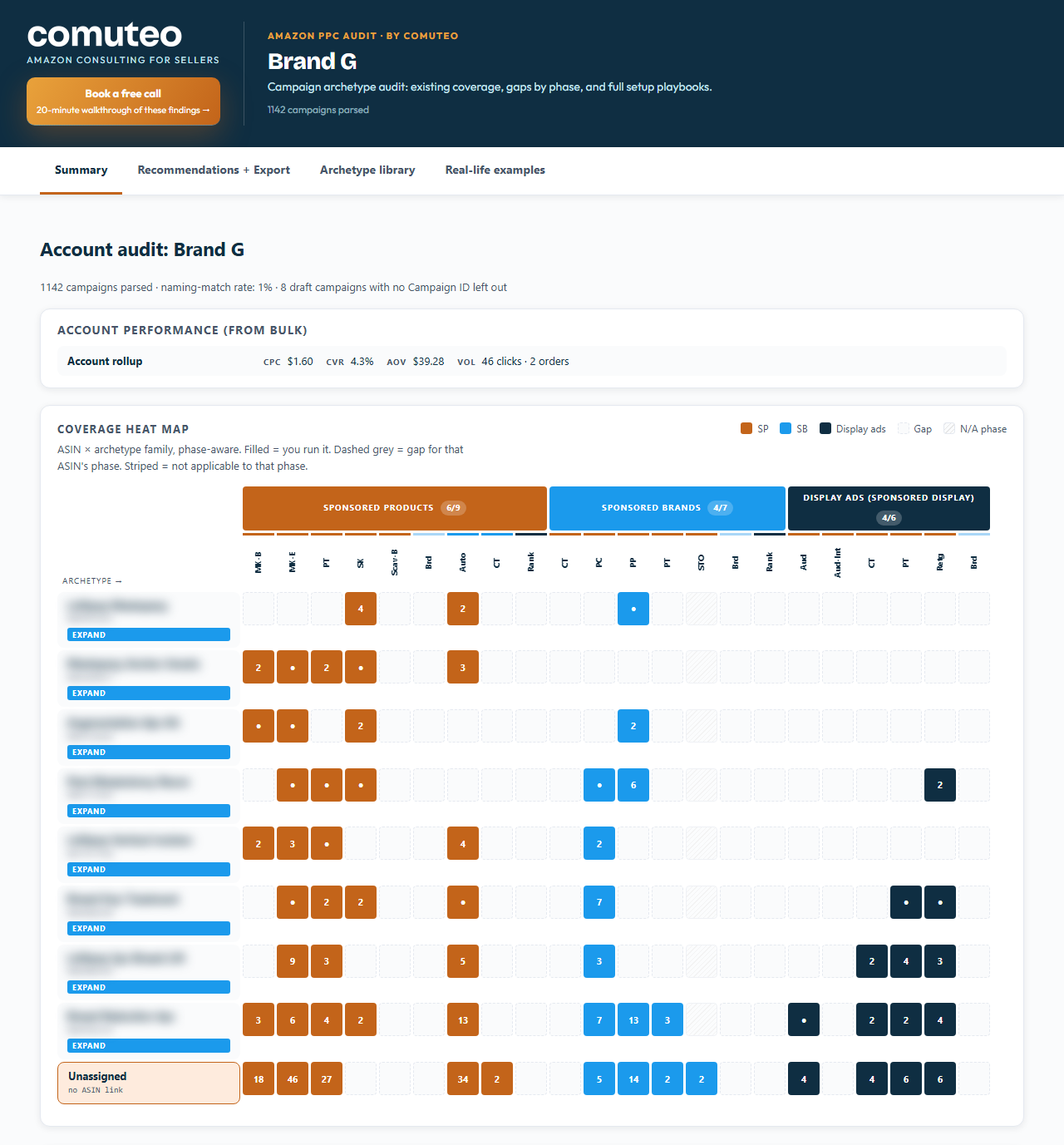
If you run display through Amazon's newer DVA+ campaigns, those campaigns may not appear in the bulk file, so a display gap there may be false.
Common structure mistakes
- Campaigns compete with each other, budgets are spread too thin and bids are set once and forgotten, which are the problems I find in most accounts I open for PPC management.
- The campaigns have no negatives between them, so brand searches spend inside generic campaigns.
- A campaign is launched with the plan to switch its targeting later. Amazon's guide says targeting cannot be changed on a live campaign, so the change means building a new one.
Keep the structure current
Products move from one stage to the next and new products join the account, so the grid you build today goes out of date. I run the coverage check monthly on client accounts and whenever I take on a new account, and I compare each product's row with its current stage.
Frequently asked questions
What is the best Amazon PPC campaign structure?
The structure I use gives every campaign one goal and fits each product's stage. Each targeting type runs in its own campaign so that it reports on its own, and brand shielding is built first. Because a launch product and an established product need different campaigns, check each product against its own stage.
Should I start with auto or manual campaigns?
Amazon's targeting guide suggests that new advertisers start with an automatic campaign and let it run for about two weeks before creating a manual campaign. When you already have keyword research, the SP Bulk Builder builds the auto campaigns and the keyword campaigns in the same file. In both cases the searches that sell in the auto campaigns move into exact match keywords.
Should branded keywords have their own campaign?
They should, and Amazon's guide suggests bidding on branded keywords as a brand defense strategy. I build brand plus keyword campaigns and a brand-only campaign, and negatives in the other campaigns send brand searches to them. Brand searches on one client account I manage ran at about 29% ACOS in August and September 2026 against about 88% for everything else.
How many campaigns does an Amazon PPC account need?
A full Sponsored Products setup from the SP Bulk Builder runs to 30 to 60 campaigns. The count depends on how many keyword groups, top keywords and competitor brands you bring, since each of them gets campaigns of its own. Sponsored Brands and display campaigns come on top of that and are set up by hand.
What are the three types of Amazon PPC ads?
The three types are Sponsored Products, Sponsored Brands and display ads. My library holds 19 campaign types for Sponsored Products, 12 for Sponsored Brands and 10 for display ads. Sponsored Brands need Brand Registry and your own creative, and display ads need your own creative too.
Want a second pair of eyes on your account?
Book a free 20-minute strategy call. Bring your numbers, and we go over what I would fix first.
Book a free strategy call