
Your whole setup, decided up front
Setting up ads by hand means one campaign at a time, and the questions pile up: auto or manual first, broad or exact, what bid, what budget. A full structure runs to 30 to 60 campaigns, and Amazon's bulk spreadsheet rejects the whole upload over one bad value.
The SP Bulk Builder starts from one fixed structure, lets you change it on a form, and returns every campaign in one upload file. I used it in September 2026 to build and upload new campaigns on a client account I manage.
What you get
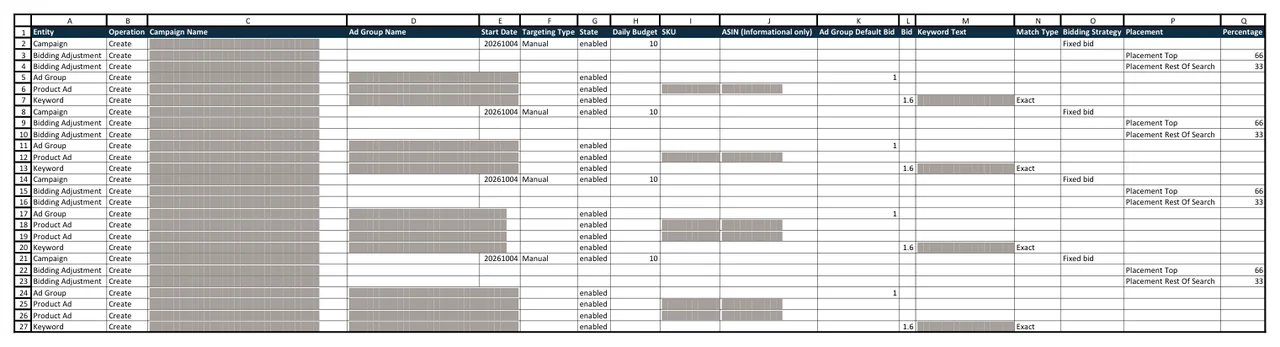
You get one Excel file in Amazon's bulk operations format, the spreadsheet you upload in Amazon Ads to create many campaigns at once. You tick the campaign types you want:
- Four auto campaigns, where Amazon picks the searches, one per targeting type so each reports on its own.
- Keyword campaigns for each keyword group, in broad, phrase and exact match.
- A campaign of its own for each of your highest-volume keywords.
- Brand plus keyword campaigns and a brand-only campaign.
- Product targeting campaigns aimed at each competitor brand's products.
- A catch-all auto campaign at a low bid, $0.10 unless you change it.
Bids, extra bids for the top of search, and negative keywords come from fixed defaults, with an advanced section on the form for exceptions. The negatives send each search to the campaign built for it, so brand searches go to the brand campaigns. Every campaign follows one naming pattern. The file covers Sponsored Products only, and Sponsored Brands and display ads are set up by hand.
Before anything goes live
The campaigns are created switched on and start running once Amazon processes your upload, so the skill does its checks first:
- It refuses a start date in the past, which Amazon would reject.
- It trims the product name in any campaign name over 120 characters and leaves the keyword whole.
- Before it hands you the file, it checks the campaign count, every budget and bid, and where each negative sits.
Each campaign has its own daily budget, so add up the total and spot-check a few campaigns before you upload.
What you need
- A live product on Amazon and access to Amazon Ads. Your ads don't need to be running yet, because this skill builds your first campaigns.
- The form, which the skill always shows first: your products, SKUs (your own stock codes), budgets and bids.
- Three to eight keyword groups, three to eight top keywords, and your competitor brands with their ASINs (Amazon's product IDs), pasted in the chat. You bring the keyword research, and the skill can sort a flat list into groups.
- Child SKUs only (one per size or color), because Amazon rejects a parent SKU as ineligible for advertising.
- The Claude desktop app with Claude Cowork. You don't need to install anything else, and the first section of the SOP, Before You Start, shows you how to add the skill.
If you haven't launched a product yet, start with Product Validation, which helps you check a product before you buy inventory.
How a run goes
- Type /amazon-sp-bulk-builder in a Claude Cowork chat and fill in the form.
- Paste your keyword groups, top keywords and competitor ASINs.
- The skill builds the file and tells you how many campaigns and rows it made.
- Upload the file in Amazon Ads bulk operations the same day, because it carries today's start date.
Questions
Can I set my own bids?
Yes, on the form, as one value for everything or one per campaign type. If your ads already run, attach a Search Term Report and each starting bid comes from what that keyword's clicks have cost you.
Will it change the campaigns I already have?
No. Every row in the file creates something new, so your current campaigns stay as they are.
Where it fits
Use it for a new launch, a new account or a rebuild. After one to two weeks of data, start the weekly routine: the Keyword Harvester and Negator, then the Bulk Bid Optimizer. After a month, the PPC Cheat Sheet checks the account for campaign types that are still missing.
In the download
One zip file. It holds the skill package, which you add once in Claude Cowork (Customize, then Add, then Upload Skill), and the SOP as both PDF and Word. The SOP is the manual: what to download from Amazon, how to run the skill, and what to do with the output. Version 2.4.4, updated October 2026.
If it isn't right for you
It's a one-time purchase of $47. If the SP Bulk Builder isn't right for you, email us within 14 days of buying it and we'll refund the full price. You don't have to give a reason.