
Your reports only show what you already run
Every Amazon ad report is built from the campaigns you already have. If you never set up a campaign that defends the searches for your brand name, or one that shows your ad on a competitor's product page, no report will tell you it's missing.
If you've wondered whether to start with auto or manual campaigns, or tried one structure after another, the Cheat Sheet shows what each campaign type is for and when to use it.
Two ways to use it
Ask about any of the 41 campaign types and you get its setup video, targeting, match type, bid formula and placement advice, where each one applies. You don't need a file for this. Every answer comes from the library bundled with the skill, so Claude never answers from memory.
The library covers 19 Sponsored Products, 12 Sponsored Brands and 10 display ad types. Amazon called display ads Sponsored Display until September 2026. Each type is tagged by goal (sales, brand shielding, research into what shoppers search for, or organic rank) and by the product's stage: launch, expand or harvest.
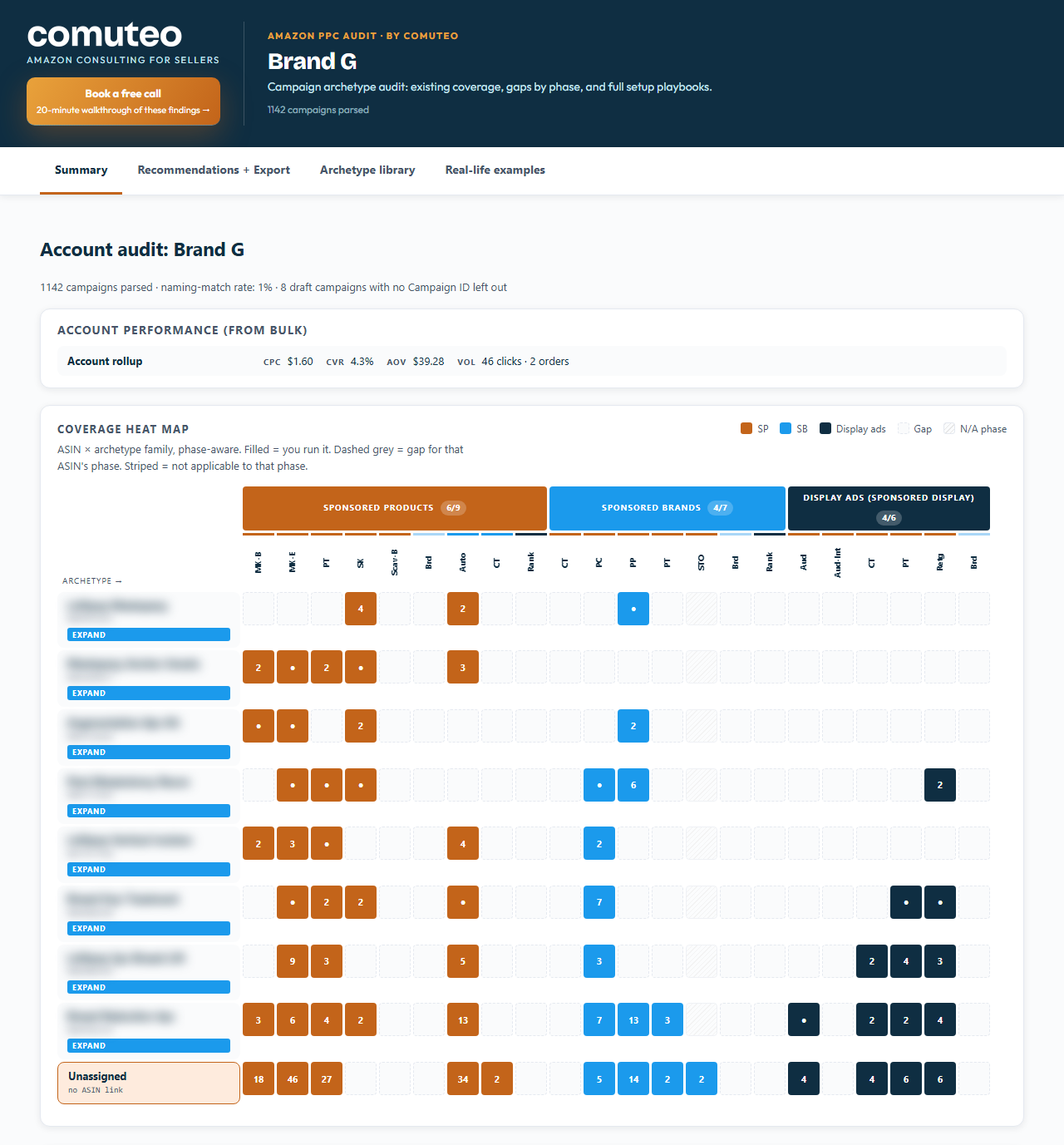
Attach your bulk operations file (the spreadsheet of your campaigns from Amazon Ads) and the skill audits the account. A script matches your campaigns, display ones included, to the 41 types, lists any it can't match, and shows the gaps for each product and stage. If you launched recently, that shows which launch campaigns you have. On an established account, it finds the types that were never set up.
What you get from an audit
- A dashboard with four tabs: a coverage map of which campaign types each product has, the recommendations with an export, the full library, and 13 examples from real accounts.
- Recommendations listed in the order to launch them, starting with brand shielding, the campaigns that defend your brand's searches. Those gaps are flagged whatever stage the product is in.
- An upload file for the missing Sponsored Products campaigns, each with a suggested bid and daily budget from your own account's numbers.
- Sponsored Brands and display ad campaigns need your own headlines, images or video, so the dashboard marks them for setup by hand, and they stay out of the upload file.
Nothing goes live until you switch it on
Every campaign in the upload file is created paused. You fill in any blanks the file marks, such as a product ID the audit can't know, then switch on the ones you want. The skill never guesses a product's stage: you tell it, or you skip the question and see every possible gap.
If you run display through Amazon's newer DVA+ campaigns, tell the skill. Those campaigns may not appear in the bulk file, so a display gap there may be false.
What you need
- For the library, only your question.
- For an audit, a product that's live on Amazon with ads running, and a bulk operations file with at least 30 days of performance data. If you haven't launched yet, the library is the part you can use now, and Product Validation is the place to start.
- Your brand name, the products to audit (their ASINs, Amazon's product IDs) and the stage each one is in.
- Optionally, a SellerSprite Reverse ASIN or Keyword Mining export, for better campaign names.
- Amazon Brand Registry to launch Sponsored Brands campaigns, and maybe display ad campaigns too, as the notice at the top of this page explains.
- The Claude desktop app with Claude Cowork. You don't need to install anything else, and the first section of the SOP, Before You Start, shows you how to add the skill.
How a run goes
- Type /amazon-ppc-cheat-sheet in a Claude Cowork chat. Ask a question, or attach the bulk operations file for an audit.
- For an audit, answer the intake in one message: your brand, the ASINs and their stages.
- Review the recommendations, untick any you don't want, and download the export.
- Fill in any blanks the file marks, upload it in Amazon Ads bulk operations, and switch on the campaigns you want.
Questions
How is this different from the PPC Account Audit?
The Account Audit judges the campaigns you have. The Cheat Sheet finds the campaign types you don't have and builds the missing Sponsored Products ones.
Will it tell me what to bid on a new campaign?
Yes. Each new Sponsored Products campaign comes with a suggested bid (your target ACOS times your average order value times your conversion rate) and a daily budget. Where your account lacks the data, the bid is left blank for you to set.
Does it change anything in my Amazon account?
No. It works from the file you download. The new campaigns reach your account only if you upload the file, and they arrive paused.
Where do my reports go?
Into your own Claude app, on your own Claude account. They never come to Comuteo.
Who I am
I'm Rogerio de Andrade. I spent 30 years developing brands in multinationals, then built my own Amazon private label business past $100,000 in sales. I use this skill in my own client work.
Where it fits
Run the audit monthly, or when you take on a new account. When many Sponsored Products campaigns are missing, the SP Bulk Builder builds the full set in one file. To find single keywords with search volume your ads are missing, use the PPC Gap Finder.
In the download
One zip file. It holds the skill package, which you add once in Claude Cowork (Customize, then Add, then Upload Skill), and the SOP as both PDF and Word. The SOP is the manual: what to download from Amazon, how to run the skill, and what to do with the output. Version 2.3.5, updated October 2026.
If it isn't right for you
It's a one-time purchase, with no monthly fee and no percentage of your ad spend. If the PPC Cheat Sheet isn't right for you, email us within 14 days of buying it and we'll refund the full price. You don't have to give a reason.