
What is a click worth to you?
A bid is the most you'll pay for one click on your ad. The skill sets it from what a click brings in: your revenue per click (ad sales divided by clicks) times your target ACOS, the share of ad sales you're willing to spend on ads. If a click brings in $2.40 of sales and your target is 30%, the most you should pay for it is $0.72.
A Python script does all the math, so the same file always gives the same result, and Claude never sets a bid itself.
Limits that keep it steady
- A keyword that's selling and already close to your target is left alone.
- Each run moves a bid by a capped amount, 15% either way on the Balanced strategy, apart from the test raise below, and you set the floor and ceiling for every bid.
- A keyword that's running above your target ACOS, or spending with no orders, is never raised once it has 3 clicks or more.
- A live campaign with 3 clicks or fewer in the last 30 days gets a 20% raise on every bid, up to your ceiling, so it gets a real test.
- A keyword with even one order is never paused automatically, and nothing is paused until there are enough orders to judge.
- Keywords with your brand name can have their bids lowered, and the 20% test raise is the only way they go up.
- It never pauses a whole campaign. Searches to negate are listed for you to act on.
You approve every change
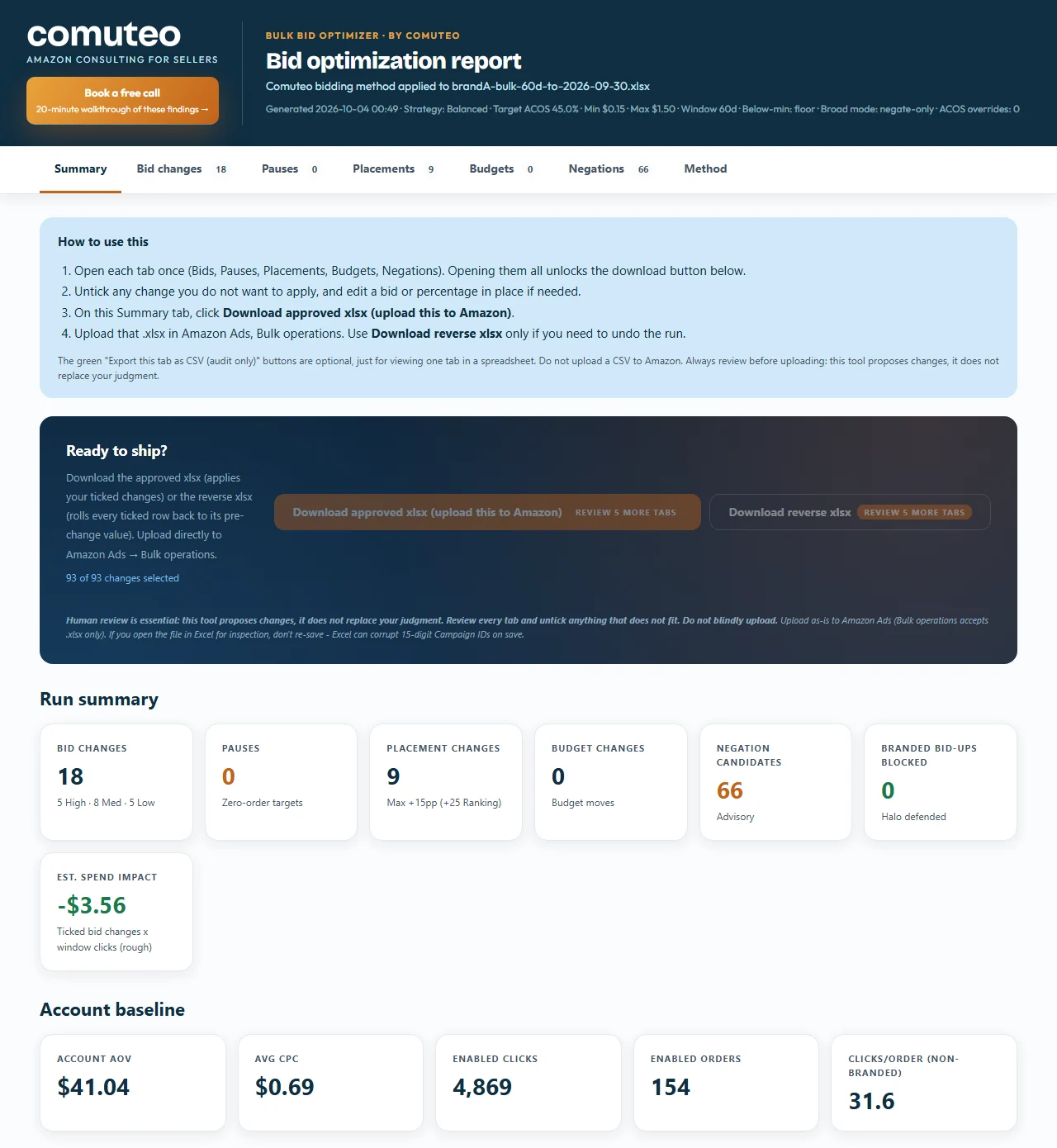
The dashboard opens in your browser with tabs for bids, pauses, placements (where on Amazon your ad appears), budgets and negations. You open each tab, untick anything you don't want and edit a bid by hand if you like. The dashboard checks your edits against the limits. Then it builds two files from what you kept: the upload file for Amazon, and a reverse file that puts back the old bids, pause settings, placements and budgets if you ever need to undo the run.
Nothing connects to your Amazon account. The skill works from the file you download, and your bids change only when you upload.
What it doesn't know
The bids follow the target ACOS you give it. If that target is above your break-even ACOS, the bids will be set to lose money, so set it from your margin. The skill also can't see what competitors bid on a keyword or your share of the top of search, so look closely at large cuts on brand or ranking keywords before you upload.
Five strategies
You pick one before anything runs:
- Profit-First, for established products where you want profit before growth.
- Balanced, the default, for steady growth.
- Launch, for products in their first eight weeks. It bids a little bolder to gather data and visibility, and waits longer before pausing.
- Ranking Push, for climbing or holding the top of the search results on chosen keywords, for a limited time.
- ACOS-Targeted, CPC-Managed, for scaling sales by feeding budget to the winners while bringing cost per click down.
What you need
- A product that's live on Amazon, with Sponsored Products ads running. The skill sets bids from what your clicks have already earned. If you haven't launched yet, start with Product Validation.
- A bulk operations file, the spreadsheet of your campaigns, keywords and bids from Amazon Ads. The strategy decides the date window (7 days for Launch, 30 for Balanced), and the skill tells you which one after you choose. If that window isn't 30 days, the skill also asks for a 30-day file, which it uses to find campaigns with almost no clicks.
- Your target ACOS. You can set different targets by portfolio or campaign.
- The lowest and highest bid the skill may set (Min CPC and Max CPC), and your brand terms, or "none".
- The Claude desktop app with Claude Cowork. You don't need to install anything else, and the first section of the SOP, Before You Start, shows you how to add the skill.
How a run goes
- Type /amazon-bulk-bid-optimizer in a Claude Cowork chat. The skill explains all five strategies first.
- Pick a strategy, download the bulk file for the window it names, and attach it. Then answer its questions in one message.
- Review every tab of the dashboard and untick what you don't want.
- Download the upload file and upload it in Amazon Ads bulk operations. Keep the reverse file in case you need to undo.
Questions
My product is new. Which strategy should I use?
Launch, which is built for products in their first eight weeks. It lets your ACOS run about one and a half times your target while it gathers data, and like every strategy, it won't pause a keyword until there are enough orders to judge.
Does it change Sponsored Brands bids?
No. It covers Sponsored Products only.
Do I need Brand Registry?
No. It works from the bulk operations file, which you download from Amazon Ads.
Where do my reports go?
Into your own Claude app, on your own Claude account. They never come to Comuteo.
Who I am
I'm Rogerio de Andrade. I spent 30 years developing brands in multinationals, then built my own Amazon private label business past $100,000 in sales. I use this skill in my own client work.
Where it fits
Run it weekly, after the Keyword Harvester and Negator, so bid changes land on clean traffic. The PPC Account Audit shows where spend is leaking, and this skill turns that into bid changes.
In the download
One zip file. It holds the skill package, which you add once in Claude Cowork (Customize, then Add, then Upload Skill), and the SOP as both PDF and Word. The SOP is the manual: what to download from Amazon, how to run the skill, and what to do with the output. Version 3.3.2, updated October 2026.
If it isn't right for you
It's a one-time purchase, with no monthly fee and no percentage of your ad spend. If the Bulk Bid Optimizer isn't right for you, email us within 14 days of buying it and we'll refund the full price. You don't have to give a reason.